From a .proto file to a working Rust server: a beginner-friendly guide to gRPC with a hands-on Rust + Tonic proof of concept.
Most developers first meet service-to-service communication through REST and JSON. gRPC takes a different route: you describe your API once in a small contract file, and tools generate the networking code for you. This post explains the idea, walks through the workflow with diagrams, shows what actually travels over the network, and finishes with a compact Rust + Tonic example covering all four gRPC communication patterns.
1. What Is gRPC?
gRPC is an open-source framework for Remote Procedure Calls (RPC). With RPC, one program calls a function that actually runs in another program, possibly on another machine, and the call looks like an ordinary local function call. gRPC uses Protocol Buffers (Protobuf) to define the API and encode messages as compact binary data, and HTTP/2 to carry them over the network.
An analogy. Think of a restaurant. The .proto file is the menu: it lists what you can order and what you get back. The generated client is the waiter who carries your order. The server is the kitchen. Because everyone uses the same menu, nobody misunderstands the order.
Small Correction Worth Knowing
gRPC was created at Google, but the "g" does not officially stand for "Google". The gRPC project gives the "g" a different meaning in every release. "Google Remote Procedure Call" is a popular guess, not the official name.
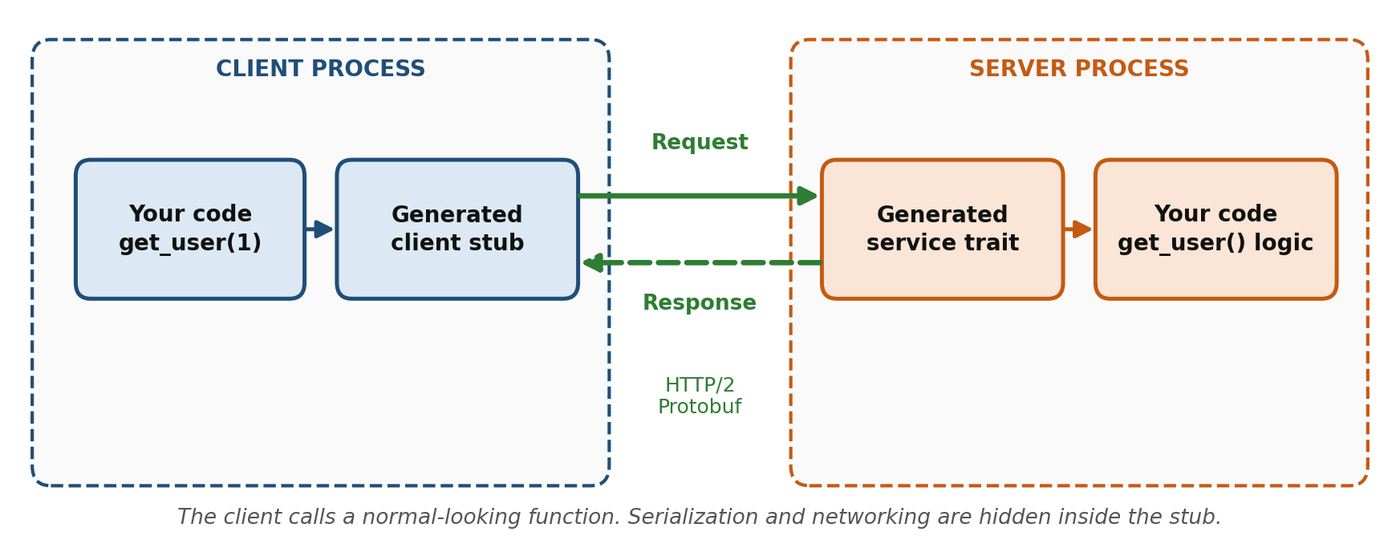
get_user(1)- Your client code calls
get_user(1). It looks like a local call. - The generated client stub turns the request into Protobuf bytes and sends them over HTTP/2.
- The server's generated service code decodes the bytes and calls your real
get_user()logic. - The response comes back the same way and arrives as a normal return value.
2. Key Terms
| Term | Meaning |
|---|---|
| RPC | Calling a method that runs in another process or service. |
| Protobuf | A language-neutral format for defining messages and services, and for serializing data compactly. |
.proto file | The shared contract: services, methods, request and response messages, and fields. |
| Stub | Generated client-side code that makes a remote method look like a local one. |
| HTTP/2 | The transport gRPC is built on. It carries many independent streams over one connection. |
| Tonic / Prost | Tonic is the Rust gRPC framework. Prost encodes and decodes Protobuf messages in Rust. |
protoc | The Protocol Buffers compiler used during code generation. |
3. The Workflow: From Contract to Running Services
The central idea is that both sides are generated from one file. Figure 2 shows the pipeline in a Rust project.
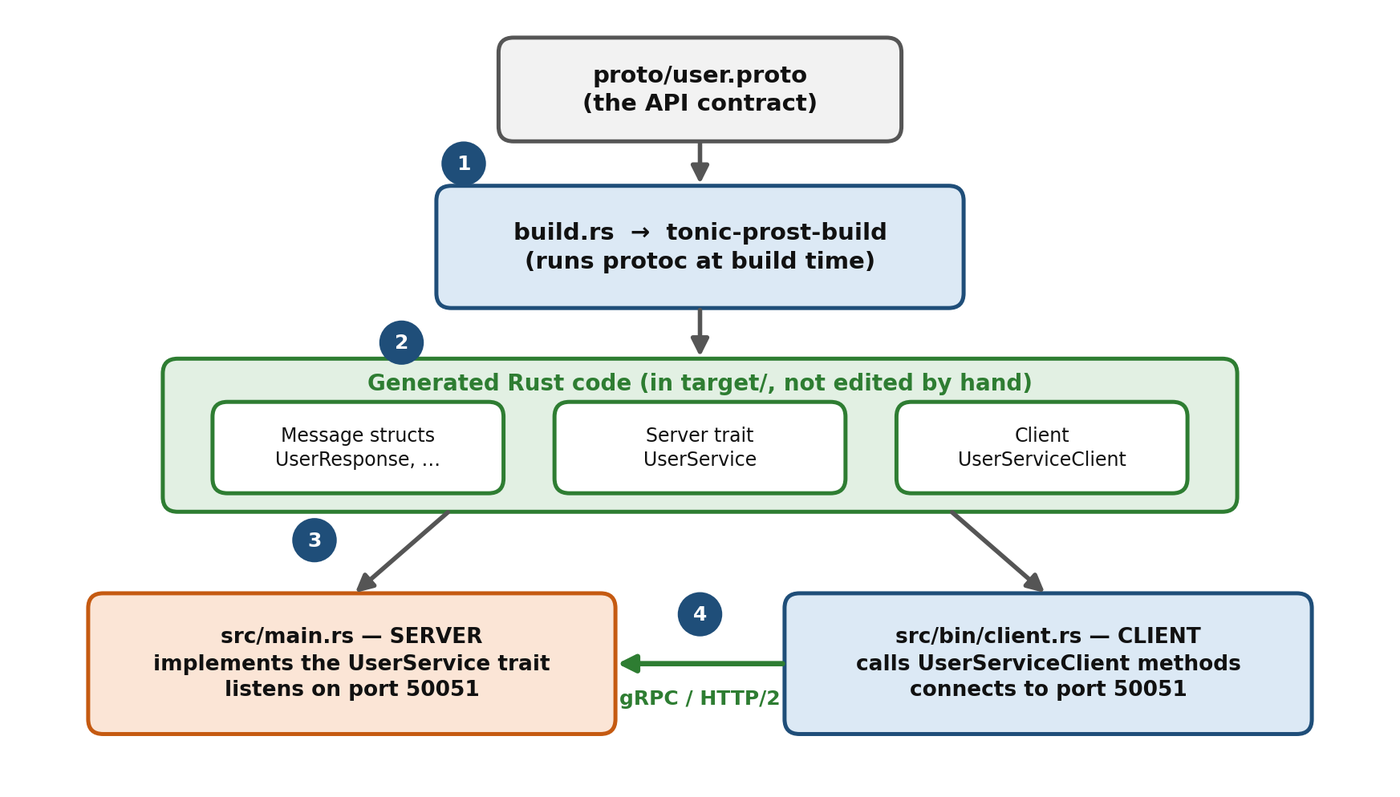
- Write the contract in
proto/user.proto. - Generate code. During
cargo build,build.rscallstonic-prost-build, which runsprotocand produces message structs, a server trait and a client. - Use the generated code. The server implements the
UserServicetrait; the client callsUserServiceClient. - Run. The call is encoded to binary, sent over HTTP/2, decoded by the server, handled and answered.
Because both sides come from the same contract, a mismatch in message shape becomes a compile error instead of a runtime surprise.
4. The Contract and Why Protobuf Is Compact
The POC defines a UserService with five methods. The word stream decides the communication pattern.
syntax = "proto3";
package user;

service UserService {
  // Unary
  rpc GetUser(GetUserRequest) returns (UserResponse);
  rpc CreateUser(CreateUserRequest) returns (UserResponse);
  // Server streaming
  rpc ListUsers(ListUsersRequest) returns (stream UserResponse);
  // Client streaming
  rpc UploadUsers(stream CreateUserRequest) returns (UserResponse);
  // Bidirectional streaming
  rpc Chat(stream ChatMessage) returns (stream ChatMessage);
}

message GetUserRequest    { int32 id = 1; }
message CreateUserRequest { string name = 1; string email = 2; }
message ListUsersRequest  {}
message UserResponse      { int32 id = 1; string name = 2; string email = 3; }
message ChatMessage       { string username = 1; string message = 2; }
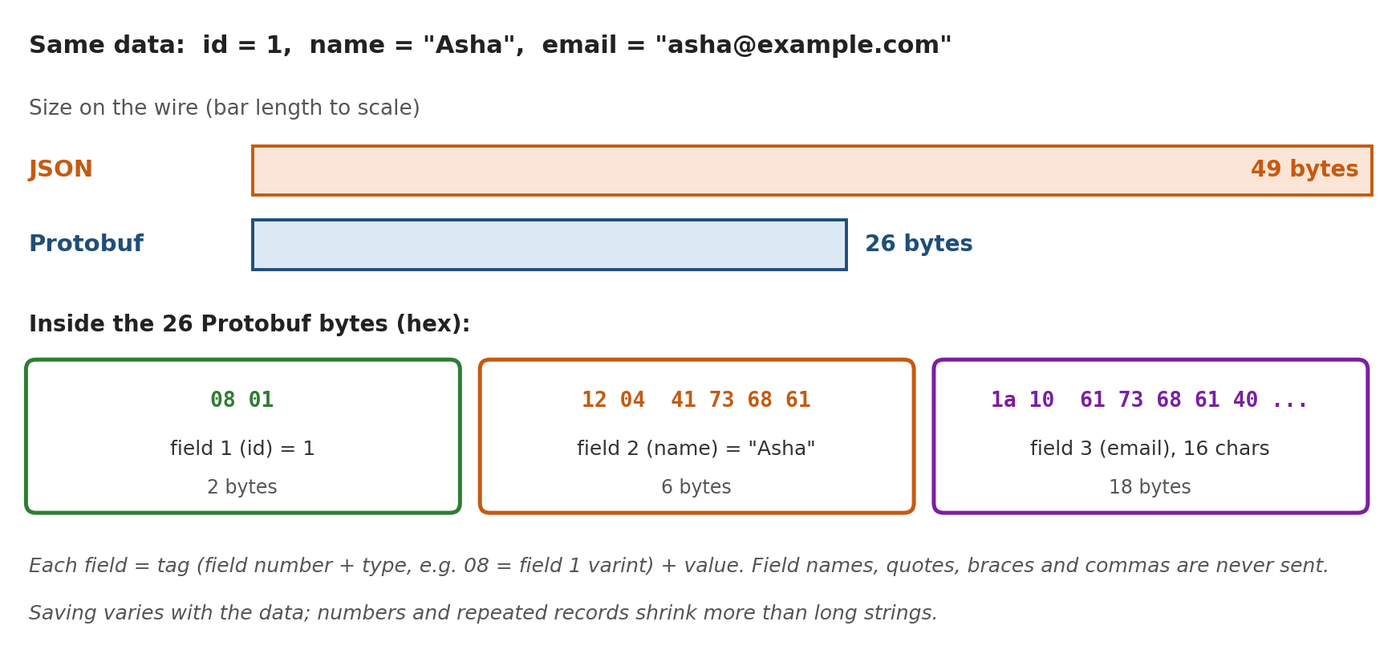
Each field has a field number (id = 1, name = 2). On the wire, Protobuf sends the number, not the name. Figure 3 shows the same user record as JSON and as Protobuf; the Protobuf size was checked with the official Protobuf library.
Changing a Schema Safely
| Safe change | Breaking change |
|---|---|
| Add a new field with a new number | Change the number of an existing field |
| Remove a field, then mark its number and name reserved | Reuse a number that was used before |
| Rename a field (binary data is unaffected) | Change a field to an incompatible type |
Old clients ignore fields they do not know about, which is what lets servers and clients upgrade at different times.
5. The Four Communication Patterns
gRPC is not limited to "one request, one response". Figure 4 shows all four patterns.
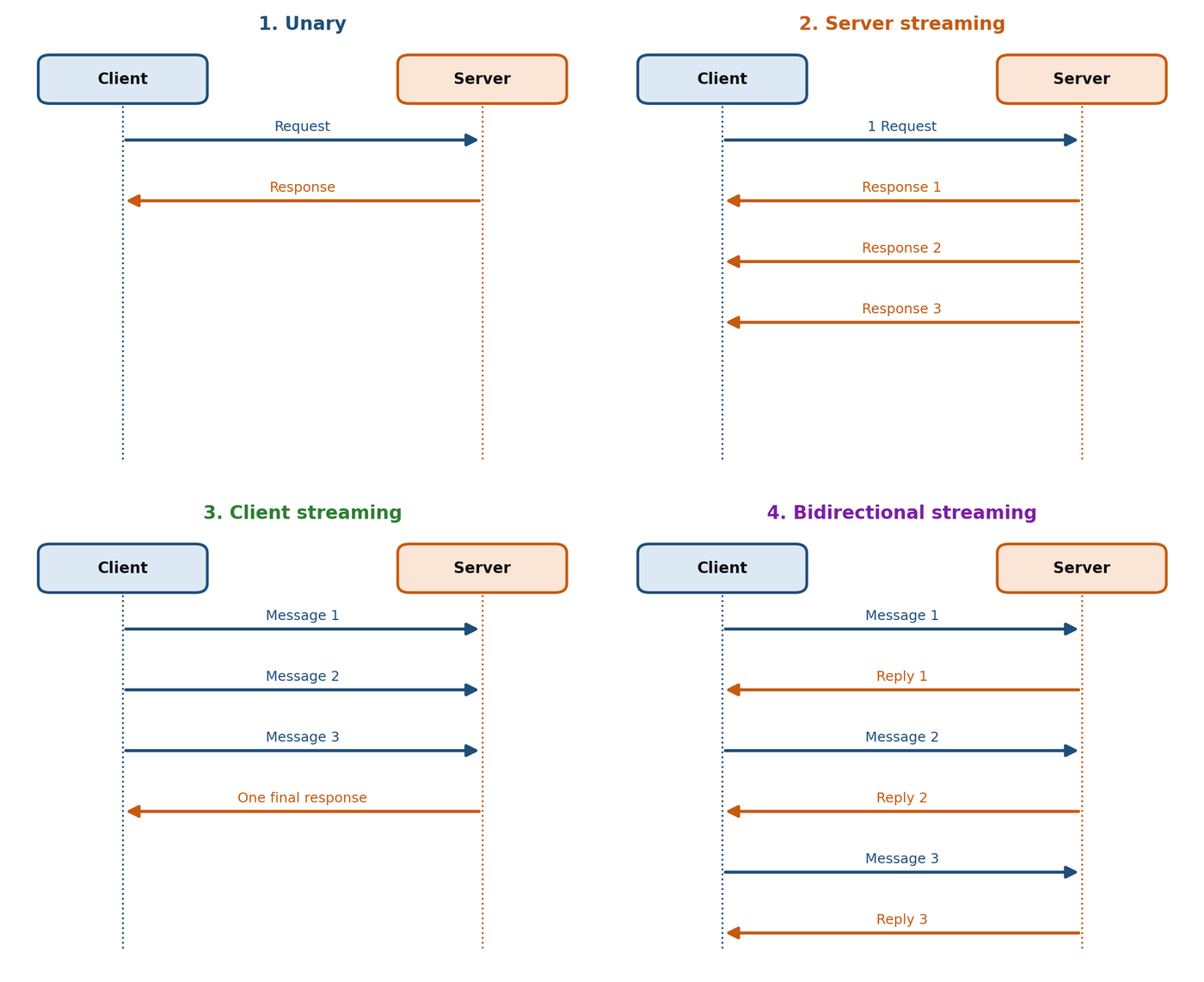
| Pattern | Where "stream" appears | POC result | Good for |
|---|---|---|---|
| Unary | Nowhere | GetUser, CreateUser: one request, one response | Fetch or create one record |
| Server streaming | Response | ListUsers: one request, three users streamed back | Large results, live updates |
| Client streaming | Request | UploadUsers: three users sent, one summary back | Uploads, batches, telemetry |
| Bidirectional | Both | Chat: three messages sent, a reply for each | Chat, real-time collaboration |
In bidirectional streaming the two directions are independent. The diagram alternates messages for clarity, but a real server may reply at any time.
6. What Happens on the Wire
Under the hood, a gRPC call is an HTTP/2 exchange. The client sends request headers (including the method path such as /user.UserService/GetUser) and then the message. The server replies with headers, the message, and finally trailers that carry the result in grpc-status. Every call gets its own HTTP/2 stream, and many streams share one connection (Figure 5).
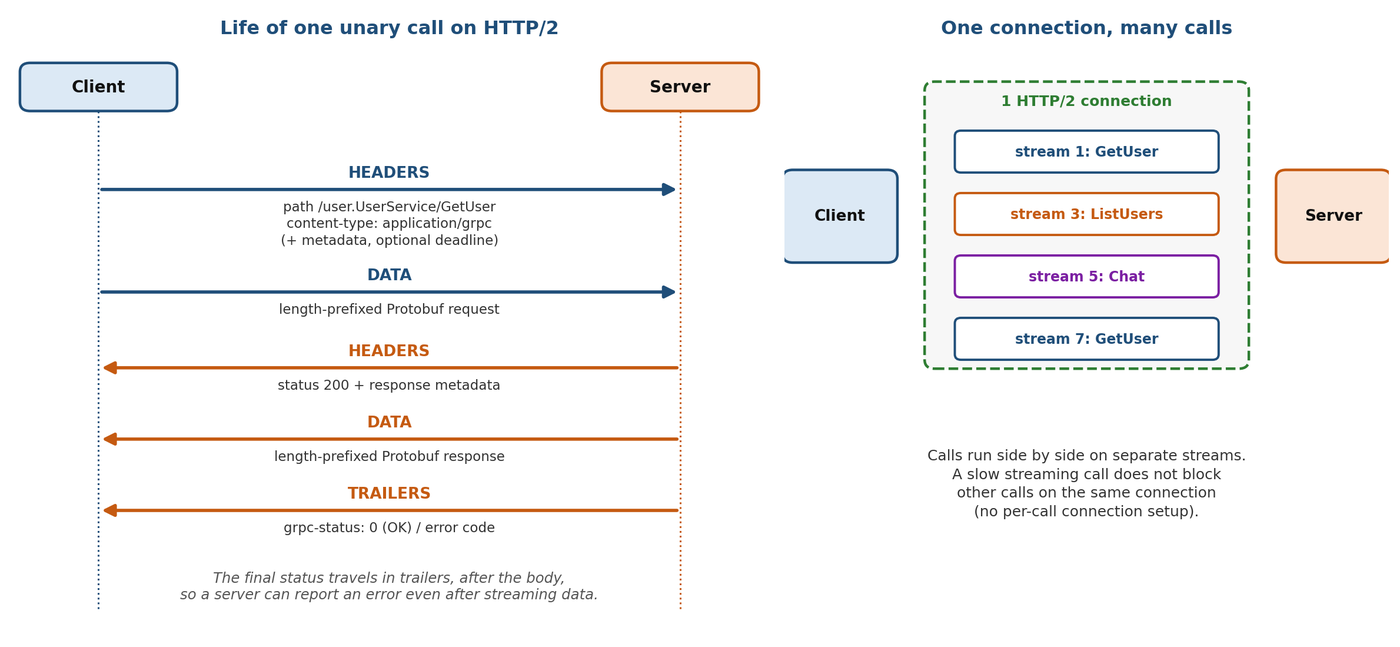
- Metadata is key-value information sent with a call, such as an auth token or a request ID. It travels in the headers.
- Deadlines let a client say "give up after N seconds". The deadline is passed to the server so both sides stop work together.
- Status codes (
OK,NOT_FOUND,INVALID_ARGUMENTand others) replace HTTP status numbers for application results.
How the Connection Is Opened: The Handshake
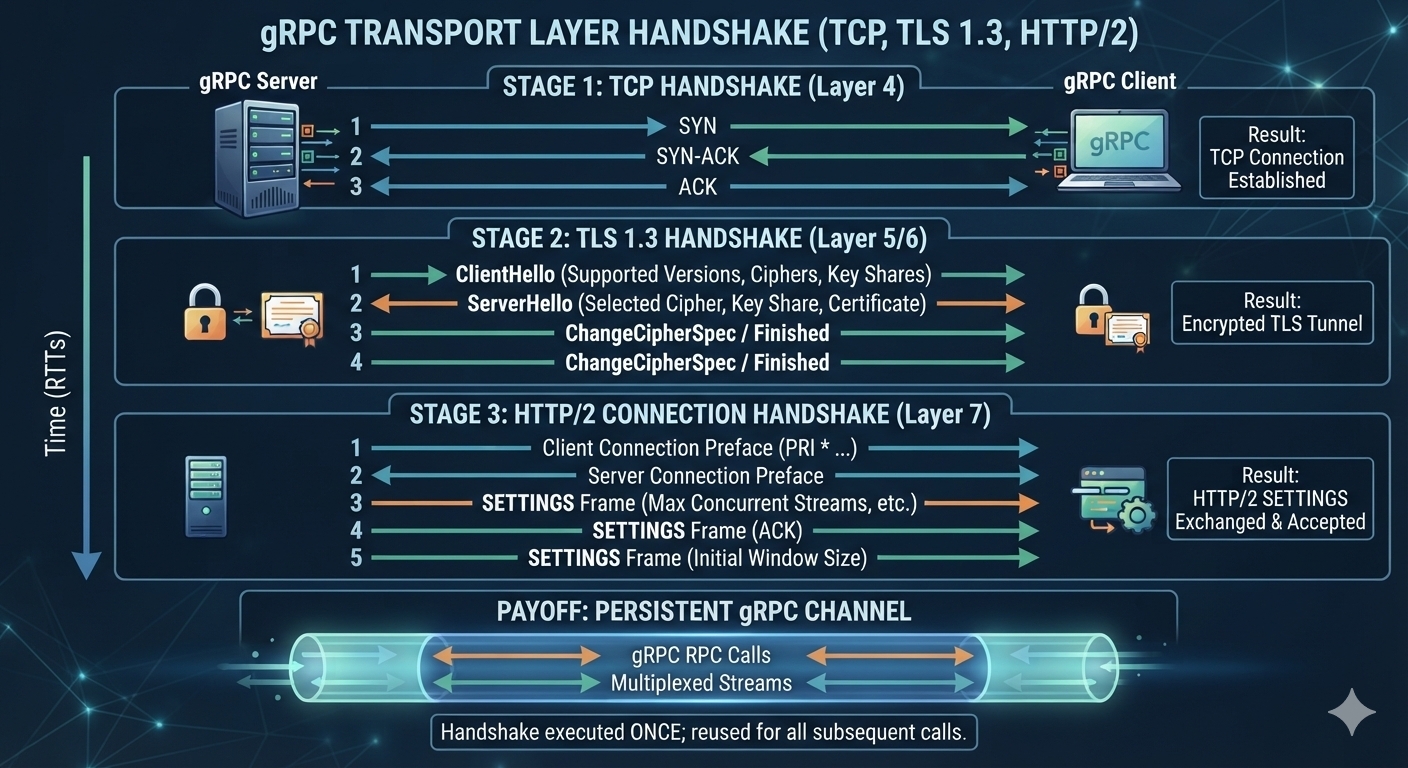
Everything above assumes a connection already exists. Opening one takes three short handshakes, stacked on top of each other (Figure 6). They run once; after that, every call reuses the same connection.
An analogy. Think of a phone call. First you dial and wait for the other person to pick up (TCP). Then you agree on a secret language so nobody listening in can understand you (TLS). Finally you agree on the rules of the conversation, such as how many topics can be discussed at the same time (HTTP/2). After that you can talk about as many topics as you like without dialing again.
| Stage | Question it answers | Result | In our POC? |
|---|---|---|---|
| 1. TCP | Can the two machines reach each other reliably? | An open connection | Yes |
| 2. TLS 1.3 | Who is the server, and how do we hide the traffic? | An encrypted tunnel | No, the POC uses plain http:// |
| 3. HTTP/2 | What are the rules for sending many calls at once? | Agreed HTTP/2 settings | Yes |
Stage 1: TCP Handshake
Three tiny messages open the connection. The client sends SYN ("can we talk?"), the server answers SYN-ACK ("yes, can you hear me?"), and the client confirms with ACK ("yes"). This costs one round trip (RTT): the time for a message to reach the server and for the reply to come back. The "Time (RTTs)" arrow on the left of the diagram shows that each stage happens after the one before it.
Stage 2: TLS 1.3 Handshake
TLS makes the connection private and proves the server is who it claims to be. The client sends a ClientHello listing the TLS versions and ciphers (encryption recipes) it supports, plus its half of a secret key (a key share). For gRPC, the client also uses a TLS extension called ALPN to say "I want to speak h2", the name of HTTP/2. The server replies with a ServerHello that picks one recipe and adds its own key share, and it sends its certificate, which is its proof of identity. Both sides now calculate the same secret key without ever sending it, and the Finished messages confirm that nobody tampered with the handshake. TLS 1.3 needs one extra round trip.
The Diagram Is Simplified
In real TLS 1.3 the certificate travels in encrypted messages right after ServerHello, and ChangeCipherSpec is only a legacy compatibility marker. The details are tidied up in the picture. What matters is the result: after one round trip both sides share the keys, and everything after that is encrypted. Stage 3 is also tidied up: in HTTP/2 the server's connection preface is itself a SETTINGS frame, and the window size is a field inside SETTINGS, not a separate step. In practice the five rows are two SETTINGS frames and two acknowledgements.
Stage 3: HTTP/2 Connection Handshake
Now the two sides agree on the rules of HTTP/2. The client sends a fixed text called the connection preface (it starts with PRI * HTTP/2.0) followed by a SETTINGS frame. The server sends its own SETTINGS frame, and each side acknowledges the other's with a SETTINGS frame marked ACK. These settings cover things such as max concurrent streams (how many calls may run at the same time) and the initial window size (how much data can be sent before the receiver must confirm it). The client does not have to wait: it can send its first request straight after its own preface, so this stage adds no extra round trip.
The Payoff: One Connection, Many Calls
With TLS 1.3, a new secure gRPC connection therefore needs about two round trips before the first request is sent: one for TCP and one for TLS. That cost is paid once per connection. The open connection, called a channel, then carries many calls at the same time as separate HTTP/2 streams, exactly as the right side of Figure 5 shows. In practice this means you should create the client once and reuse it. In Tonic you can clone a client cheaply, and every clone shares the same connection. If you connect again for every call, you pay the handshakes (and the encryption set-up) every time. If a connection is closed, for example after a long idle time or a server restart, the client simply opens a new one and the handshakes run again.
Our POC Skips Stage 2
The client in Section 7 connects to http://[::1]:50051, so there is no TLS and the traffic is not encrypted. That is fine on your own laptop, but a production service must use https:// and a real certificate (see Section 8).
7. Rust + Tonic: A Compact Example
The full POC has five methods; the snippets below keep only what is needed to understand the pattern. You need the protoc compiler installed (for example brew install protobuf or apt install protobuf-compiler).
Check the Rust Version
Recent Tonic releases need a recent Rust toolchain. When we compiled these snippets, tonic 0.14.6 required Rust 1.88 or newer and refused to build on 1.85. If you see an "rustc is not supported" error, run rustup update.
Setup
# Cargo.toml
[dependencies]
tokio = { version = "1", features = ["macros", "rt-multi-thread"] }
tokio-stream = "0.1"
tonic = "0.14"
tonic-prost = "0.14"
prost = "0.14"

[build-dependencies]
tonic-prost-build = "0.14"
// build.rs
fn main() -> Result<(), Box<dyn std::error::Error>> {
tonic_prost_build::compile_protos("proto/user.proto")?;
Ok(())
}Server: Unary and Server Streaming
pub mod user { tonic::include_proto!("user"); }

use user::user_service_server::{UserService, UserServiceServer};
use user::*;
use tonic::{Request, Response, Status};
use tokio_stream::wrappers::ReceiverStream;

#[derive(Default)]
struct MyUserService;

#[tonic::async_trait]
impl UserService for MyUserService {
    // Unary: one request in, one response out
    async fn get_user(&self, req: Request<GetUserRequest>)
        -> Result<Response<UserResponse>, Status> {
        let id = req.into_inner().id;
        if id <= 0 { return Err(Status::invalid_argument("id must be positive")); }
        Ok(Response::new(UserResponse {
            id, name: "Asha".into(), email: "asha@example.com".into(),
        }))
    }

    // Server streaming: send items through a channel
    type ListUsersStream = ReceiverStream<Result<UserResponse, Status>>;
    async fn list_users(&self, _req: Request<ListUsersRequest>)
        -> Result<Response<Self::ListUsersStream>, Status> {
        let (tx, rx) = tokio::sync::mpsc::channel(4);
        tokio::spawn(async move {
            for id in 1..=3 {
                let u = UserResponse { id, name: format!("User {id}"),
                                       email: format!("user{id}@example.com") };
                if tx.send(Ok(u)).await.is_err() { break; }
            }
        });
        Ok(Response::new(ReceiverStream::new(rx)))
    }

    // create_user, upload_users and chat follow the same shape
}
The generated trait requires all five methods, so the real file also contains create_user, upload_users and chat. Start the server like this:
Server::builder()
    .add_service(UserServiceServer::new(MyUserService))
    .serve("[::1]:50051".parse()?)
    .await?;
Client: Call and Consume a Stream
let mut client = UserServiceClient::connect("http://[::1]:50051").await?;

// Unary
let user = client.get_user(GetUserRequest { id: 1 }).await?.into_inner();

// Server streaming: read until the server closes the stream
let mut stream = client.list_users(ListUsersRequest {}).await?.into_inner();
while let Some(user) = stream.message().await? {
    println!("{user:?}");
}
Run the server and client in two terminals, selecting each binary explicitly, for example cargo run --bin <server-name> and cargo run --bin client.
Testing Without Writing a Client
Writing a whole client just to check that the server works is slow. grpcurl is like curl for gRPC: you type one command, it sends a request, and it prints the reply as readable JSON.
There is one catch. A gRPC server only understands binary Protobuf, so grpcurl must know your contract (the menu from Section 1) to turn your JSON into the right bytes. It can learn the contract in two ways:
- Pass the
.protofile with-proto. This works with our POC as it is, with no change to the server. - Server reflection. The server describes its own API on request. Tonic supports this through the
tonic-reflectioncrate, but the POC does not enable it, so a plaingrpcurl ... listanswers "server does not support the reflection API".
With the server running, open a second terminal in the project folder. First, ask which methods the contract defines:
grpcurl -plaintext -import-path proto -proto user.proto \
  [::1]:50051 describe user.UserService
Now call the unary method GetUser with the request {"id": 1}:
grpcurl -plaintext -import-path proto -proto user.proto \
  -d '{"id": 1}' [::1]:50051 user.UserService/GetUser
{
"id": 1,
"name": "Asha",
"email": "asha@example.com"
}Send an invalid id and you can see the error handling from Section 8 at work. The status code and message come straight from Status::invalid_argument:
grpcurl -plaintext -import-path proto -proto user.proto \
  -d '{"id": 0}' [::1]:50051 user.UserService/GetUser
ERROR:
Code: InvalidArgument
Message: id must be positiveStreaming methods work the same way. ListUsers takes an empty request, so pass '{}'. The three streamed users arrive one after another, as separate JSON objects:
grpcurl -plaintext -import-path proto -proto user.proto \
  -d '{}' [::1]:50051 user.UserService/ListUsers
{
"id": 1,
"name": "User 1",
"email": "user1@example.com"
}
{
"id": 2,
"name": "User 2",
"email": "user2@example.com"
}
{
"id": 3,
"name": "User 3",
"email": "user3@example.com"
}For client-streaming and bidirectional methods, use -d @ and type or pipe several JSON objects, one per line.
| Part of the command | What it does |
|---|---|
-plaintext | Connect without TLS, because our POC has none (Stage 2 of the handshake is skipped). Without it, grpcurl expects TLS and fails with "first record does not look like a TLS handshake". |
-import-path proto -proto user.proto | Tells grpcurl where the contract file is. |
-d '{...}' | The request message as JSON. Use '{}' for an empty message. |
[::1]:50051 | The server address. The POC listens on the IPv6 loopback address [::1], so use the same address here. If your server binds 127.0.0.1, use that instead. |
user.UserService/GetUser | The method to call, written as package.Service/Method. It is the same path you saw in Section 6 as /user.UserService/GetUser. |
Add -v to see the response headers as well. This is a quick way to check a server after every change, before any client code exists.
8. Errors and Security
| Tonic call | Use it when |
|---|---|
Status::invalid_argument(...) | The request data is malformed or invalid. |
Status::not_found(...) | The requested user or resource does not exist. |
Status::unauthenticated(...) | The caller has not proven who they are. |
Status::permission_denied(...) | The caller is known but not allowed to do this. |
Status::internal(...) | An unexpected server-side failure. |
The POC Has No Authentication
For production, use TLS to encrypt traffic, send credentials as metadata, and verify them in a Tonic interceptor. Apply authorization per method where needed.
9. gRPC vs REST: How to Choose
| Area | REST | gRPC |
|---|---|---|
| Style | Resources and URLs, like GET /users/1 | Methods, like GetUser(GetUserRequest) |
| Payload | Usually JSON (human-readable) | Protobuf (compact, binary) |
| Contract | Optional (often OpenAPI) | Central: the .proto file |
| Code generation | Optional | Core part of the workflow |
| Streaming | Needs extra patterns or tools | Built in, four patterns |
| Transport | HTTP/1.1 or HTTP/2 | HTTP/2 |
| Browsers | Work directly | Need gRPC-Web or a gateway |
Figure 7 turns the table into a quick decision rule.
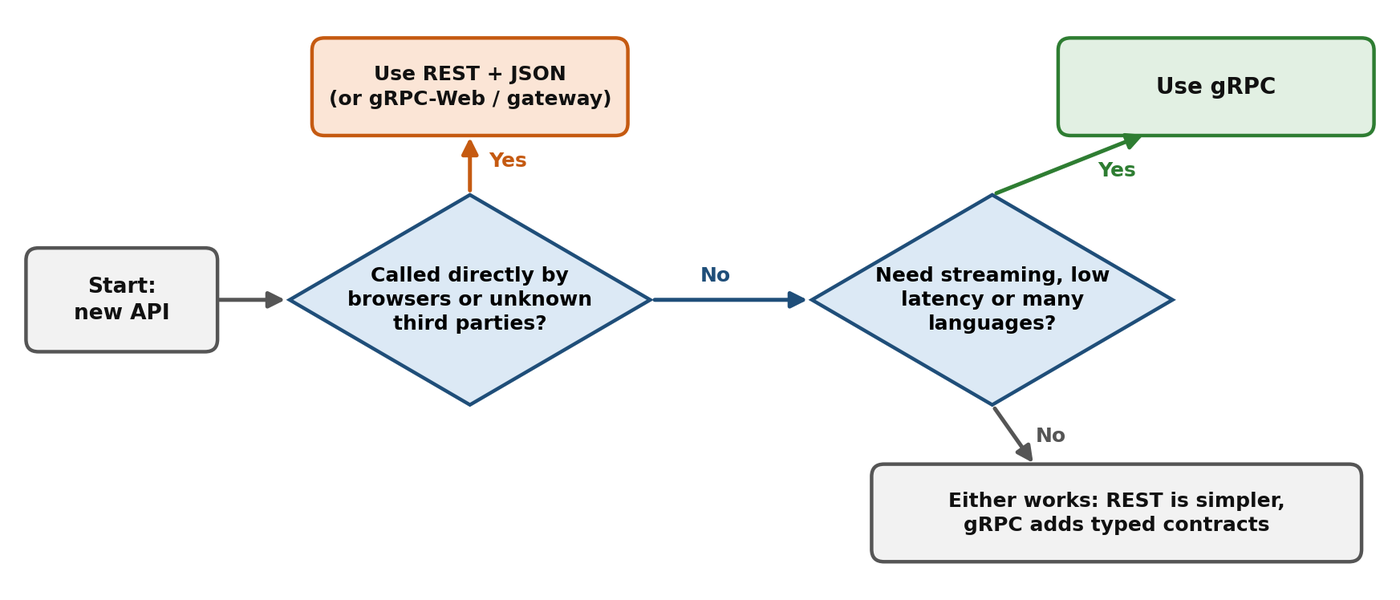
The costs of gRPC are a build step for code generation, binary payloads that are harder to read, and the need to manage schema changes carefully.
10. POC Results and Conclusion
| RPC | Pattern | Behavior tested | Status |
|---|---|---|---|
GetUser() | Unary | One request, one response | Completed |
CreateUser() | Unary | One create request, one response | Completed |
ListUsers() | Server streaming | One request, three users streamed | Completed |
UploadUsers() | Client streaming | Three users sent, one summary returned | Completed |
Chat() | Bidirectional | Three messages, three replies | Completed |
gRPC gives services a precise, typed way to talk: write the contract once, generate the code, and implement only the business logic. With Rust and Tonic the path from user.proto to a running client and server is short, and all four communication patterns work out of the box. For internal APIs and streaming workloads it is a strong choice; for simple public APIs, REST is often easier for consumers.