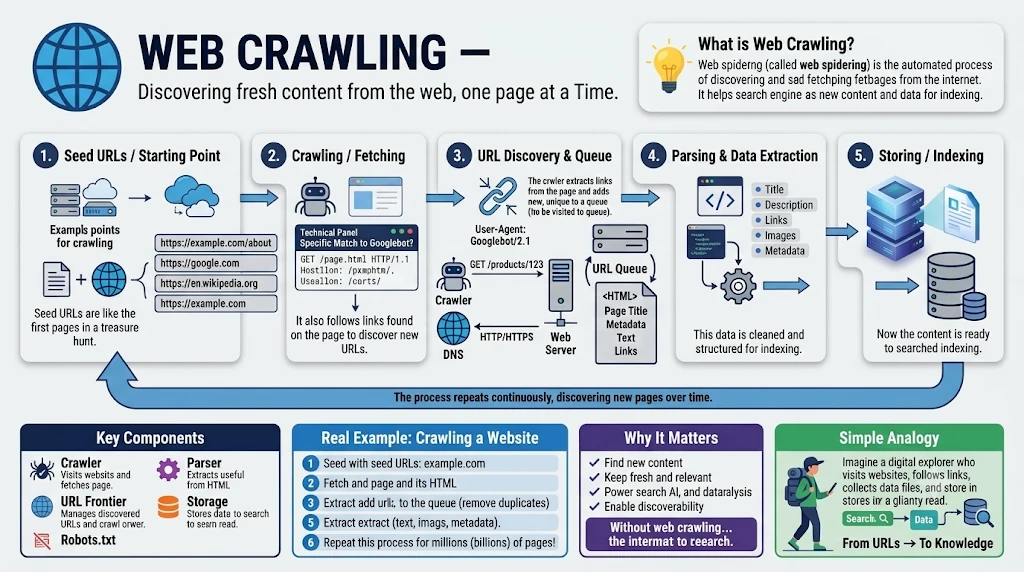
A search engine answers in a fraction of a second because it did most of the work long before you typed your query. This guide shows how crawlers discover your pages, which bots to welcome or block, and what it all means for SEO.
Bots called crawlers had already visited billions of pages and saved copies of them. This post walks through that process with diagrams. It covers what a crawler is, how it finds pages and decides what to fetch next, which bots you should welcome or block, how crawling affects SEO, and how the saved pages end up as the results you see.
1. What Is a Web Crawler?
A web crawler (also called a spider or bot) is a program that visits web pages automatically, downloads their content, collects the links on each page, and then follows those links to more pages. It does this continuously, spread across thousands of machines.
An analogy. Picture a postman who knocks on one house, copies what is written on the door, and writes down every other address mentioned there. He then visits each of those addresses in turn, and so on. The houses are pages and the addresses are links.
Why "spider"? Pages on the web are joined by hyperlinks, like threads in a spider's web. A crawler moves from page to page along those threads, exactly as a spider walks its web. In computer science terms the web is a directed graph, with pages as nodes and links as edges, and crawling is a graph traversal (Section 4 shows which kind).
Small Correction Worth Knowing
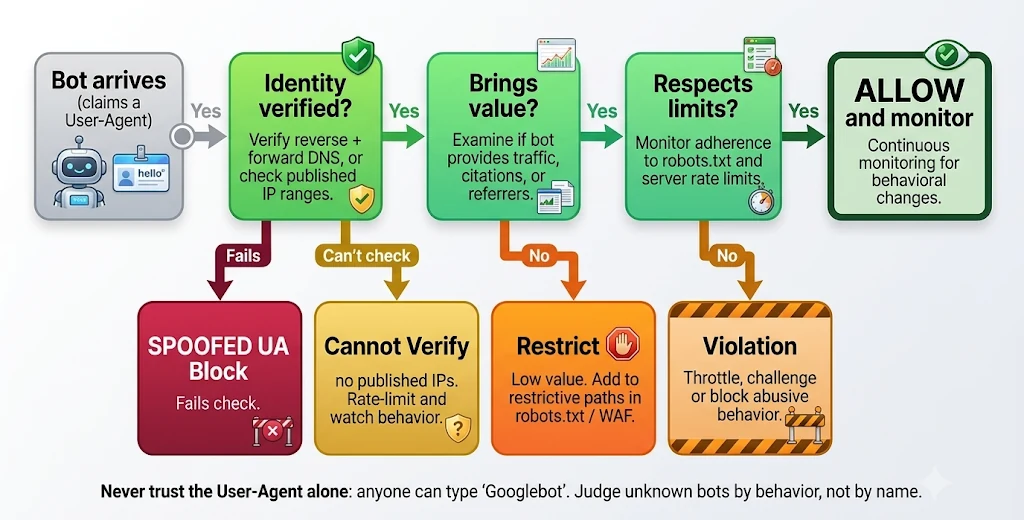
A crawler does not "browse" your site like a person. It only sends HTTP requests and reads the responses. The name it gives itself (the User-Agent) is just a claim. Anyone can type "Googlebot" in a request, so identity must be verified (Section 10).
A search engine works in four tiers, and crawling is the first. Without it there is nothing to index or rank. Figure 1 shows the whole pipeline.
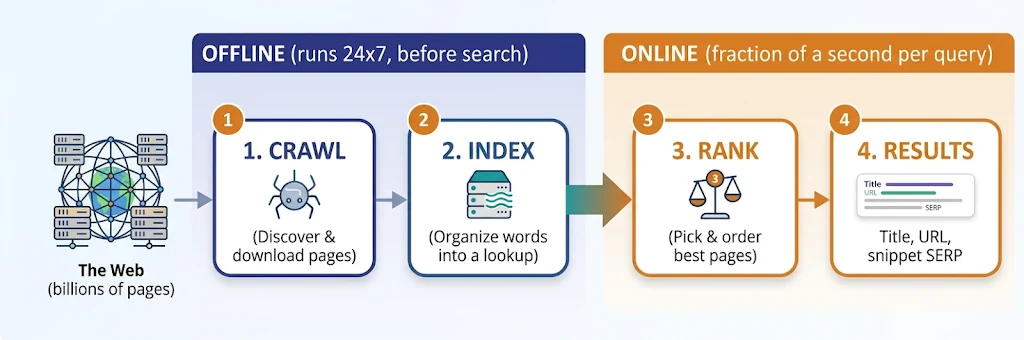
- Crawl: discover pages and download them.
- Index: break pages into words and build a fast lookup.
- Rank: score the matching pages and order them for the query.
- Results: draw the page with title, URL and snippet, and learn from clicks.
2. Key Words Made Easy
Crawling comes with its own vocabulary. Here is a quick reference you can return to while reading.
- Seed URL
- The starting point or main door where the spider begins exploring.
- URL Frontier
- The spider's waiting line or to-do list of pages to visit next.
- robots.txt
- A "Keep Out!" sign on a door that tells spiders which rooms to avoid.
- Sitemap
- A helpful treasure map given by website owners listing all their good pages.
- Crawl Budget
- How much energy and time a spider is allowed to spend on one site.
- Crawl Trap
- An endless maze (like a calendar that goes on forever) that tricks spiders.
- User-Agent
- The badge or name tag worn by the robot, like Googlebot.
- BFS
- Visiting all neighboring rooms nearby before going down deep staircases.
- Rendering
- Loading interactive pages and code so the spider sees the final picture.
- Bloom Filter
- A super fast memory game to check: "Have I visited this page before?"
- SimHash
- A quick snapshot fingerprint to catch copycats and duplicate pages.
- Canonical URL
- The official "original copy" tag when multiple pages look identical.
- DNS
- The internet address book that turns website names into house numbers.
- WAF
- A security guard at the front gate blocking mean or naughty bots.
- CDN
- Helper toy boxes around the world holding copies so pages load fast everywhere.
- PageRank
- A popularity contest where links count as votes from friend pages.
- BM25
- A math game that scores how well special or rare words match your query.
3. What Is Search Indexing?
Crawling only collects pages. Indexing organizes them so they can be found in milliseconds. Searching the live web for every query would take months; searching an index takes a moment.
An analogy. The glossary at the back of a textbook says "photosynthesis: pages 12, 45, 88". You never read the whole book. A search index does this for every important word across billions of pages. It is called an inverted index (Section 11 shows one).
Three Things, Not One
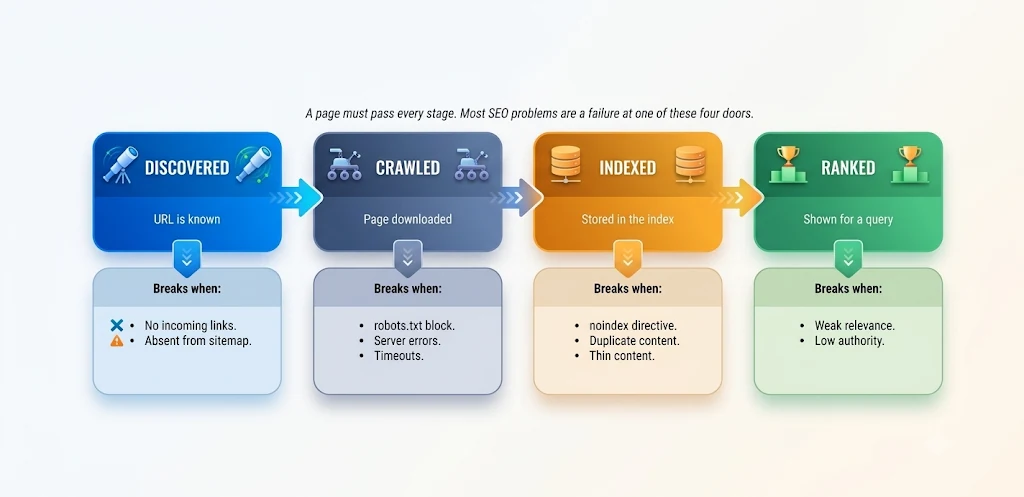
A page can be crawled (downloaded) without being indexed (stored for search), and an indexed page is not automatically ranked (shown for a query). Section 9 returns to this, because most SEO problems trace back to it.
4. How Do Web Crawlers Work?
Every crawler runs the same basic loop, shown in Figure 2 as nine steps. The links found on each page go back into the queue, which is why the crawl keeps growing on its own.
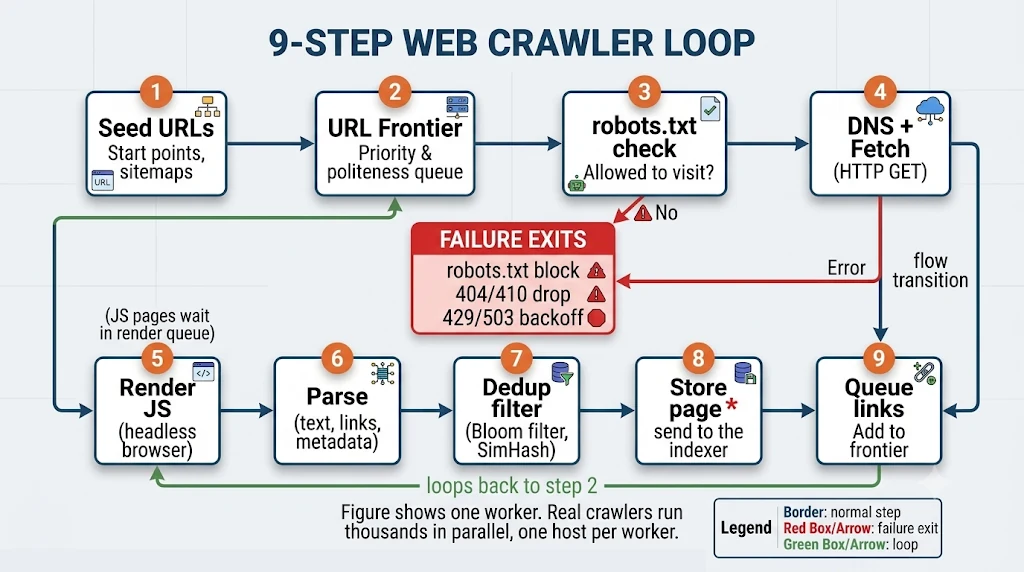
- Seed URLs start the crawl: trusted sites, sitemaps, and submitted URLs.
- The URL frontier picks the next URL by priority (importance, freshness) and by politeness (one host at a time, with delays).
- robots.txt check. The bot fetches and caches the file; blocked URLs are skipped.
- DNS and fetch. The domain is resolved to an IP address and an HTTP GET is sent. The status code decides what happens next (see below).
- Parse the initial HTML. Text, title, headings, canonical URL, structured data and every link in the raw response are extracted straight away.
- Render JS (only if needed). If the page depends on JavaScript, it is queued for a headless Chromium renderer and the final DOM is parsed again for extra content and links. Pages that need no JavaScript skip this step; JavaScript pages are parsed twice. Rendering lags behind the first fetch, so server-side rendering is safer for key content.
- Dedup. URLs are normalized (tracking parameters and fragments removed). A Bloom filter answers "seen this URL?" and fingerprints such as SimHash catch near-duplicate content.
- Store. The clean page goes to the indexer.
- Queue links. New URLs go back to the frontier with a priority score.
Which URL Comes Next? BFS, DFS and Best-First
Step 2 hides an important design choice. The crawl is a graph traversal, so the order in which URLs leave the frontier follows one of three strategies (Figure 3).
- BFS (breadth-first search) uses a queue (first in, first out). The crawler fetches every link on the seed page, then every link found on those pages, level by level. Pages close to the homepage are fetched first.
- DFS (depth-first search) uses a stack (last in, first out). It follows one chain of links as far as it goes, then backtracks. It can burn its whole budget inside one deep branch or a crawl trap.
- Best-first uses a priority queue. Each URL gets a score (link authority, freshness, change rate) and the highest score leaves first.
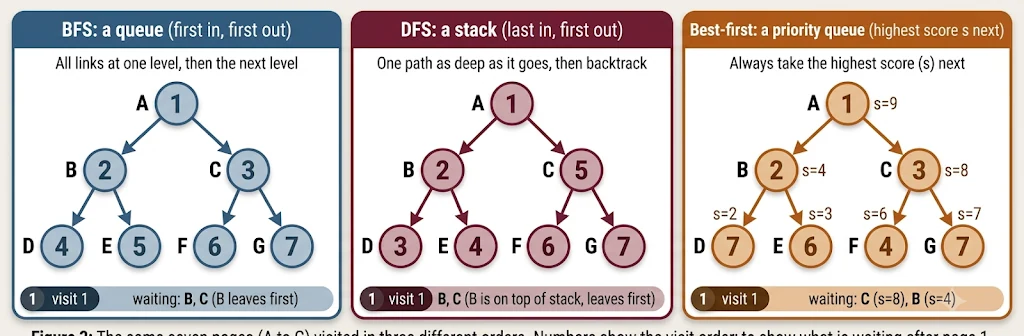
Research supports BFS as a sensible default. Najork and Wiener (2001) crawled 328 million pages breadth-first and found that high-PageRank pages arrive early, while average quality falls as the crawl continues. Cho, Garcia-Molina and Page (1998) found that ordering by partial PageRank did slightly better, with BFS close behind. Production crawlers therefore use BFS-like order with priorities and politeness rules on top, which is exactly what the two-level frontier in Step 2 does. The SEO side effect is practical: a page many clicks away from your homepage is reached late, so keep important pages shallow.
url = queue.popleft()    # BFS: take from the front, new links go to the back
url = stack.pop()        # DFS: take from the end, new links go on the same end
url = heappop(heap)[1]   # best-first: take the URL with the highest score
What the Status Code Tells the Crawler
| Status | Crawler behavior |
|---|---|
| 200 | Parse and store the page. |
| 301 / 308 | Follow the redirect and move ranking signals to the new URL. 302 / 307 is temporary. |
| 304 | Not modified. Reuse the stored copy and save bandwidth. |
| 404 / 410 | Page gone. Retry a few times (404) or drop faster (410). |
| 429 / 503 | Server overloaded. Back off and slow down. Long outages can lead to de-indexing. |
Crawl Budget and Crawl Traps
Engines cannot crawl everything, so each site gets a limited crawl budget: a rate limit (how fast the bot may go without hurting your server) and demand (how much the engine wants your pages). Budget matters most for sites with hundreds of thousands of URLs. Crawling is never finished. A scheduler learns how often each page changes and revisits it accordingly (news homepages in minutes, static pages in weeks), often with a conditional request so an unchanged page costs almost nothing. At scale, each host is also assigned to one worker, which makes politeness easy to enforce.
One more limit worth knowing: when crawling for Search, Googlebot processes only the first 2 MB of an HTML or text file (and 64 MB of a PDF). Each CSS or JavaScript file is counted separately, and almost no real page reaches the limit.
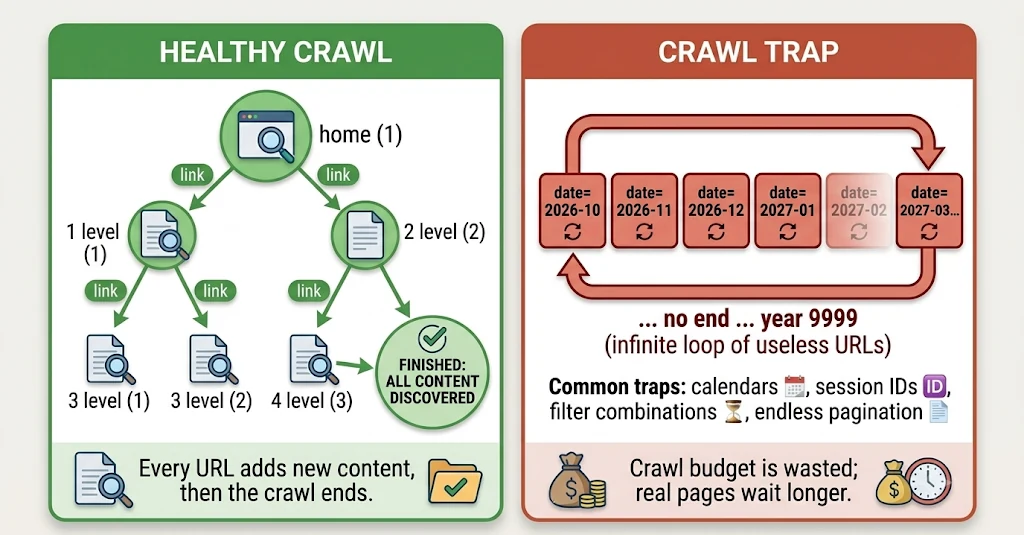
A crawl trap is a structure that creates an almost endless supply of URLs. Figure 4 contrasts a healthy crawl with a trap. DFS is the strategy most easily caught by one.
| Trap | Example URL | Fix |
|---|---|---|
| Infinite calendar | /events?month=2099-01 | Limit the date range in the URL; use canonical tags to point to the main calendar; noindex empty or duplicate date pages; avoid linking to far-future dates |
| Session IDs in URLs | /page?sid=a8f3k2 | Keep sessions in cookies, not URLs |
| Faceted filters | /shoes?color=red&size=9&sort=price | Block useless combinations; use canonical tags |
| Endless pagination | /blog?page=99999 returns 200 | Return 404 past the last page |
Real-Life Example: A New Blog Post
You publish example.com/best-laptops-2026 and add it to your sitemap. Googlebot reads the sitemap, adds the URL to its frontier, checks robots.txt, fetches the page (200), queues it for rendering, extracts the links, passes the duplicate check, and sends it to the indexer. Hours or days later it is searchable. Whether anyone sees it depends on ranking.
5. List of Search Web Crawlers
These are the best-known search engine crawlers. The token is what you write after User-agent: in robots.txt.
| Crawler | Operator | robots.txt token | Notes |
|---|---|---|---|
| Googlebot | Googlebot | Main crawler (smartphone and desktop). Reads the first 2 MB of an HTML file and 64 MB of a PDF. | |
| Googlebot-Image / -Video / -News | Googlebot-Image, -Video, -News | Vertical crawlers for images, video and news. | |
| Google-InspectionTool, AdsBot-Google | Google-InspectionTool, AdsBot-Google | Search Console testing tools; ad landing page checks. | |
| Bingbot | Microsoft | bingbot | Main Bing crawler. |
| DuckDuckBot | DuckDuckGo | DuckDuckBot | Own crawler plus partner data. |
| Applebot | Apple | Applebot | Spotlight, Siri and Safari suggestions. |
| Baiduspider | Baidu | Baiduspider | Leading engine in China. |
| YandexBot | Yandex | Yandex | Leading engine in Russia. |
| Naver Yeti | Naver | Yeti | Leading engine in South Korea. |
| PetalBot | Huawei | PetalBot | Petal Search and Huawei assistant features. |
6. AI Web Crawlers
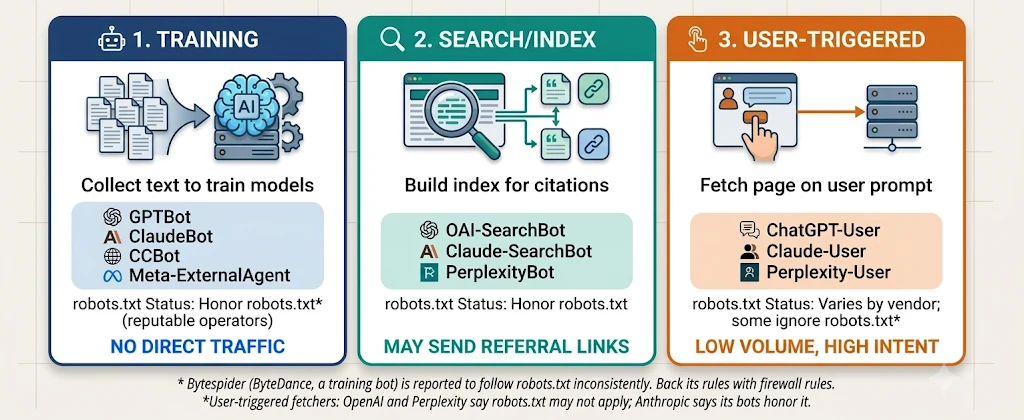
AI companies run their own bots, and they visit for different reasons than search engines. The most useful way to understand them is by job, not by company. Figure 5 groups them into three.
| Crawler | Operator | Job | robots.txt token |
|---|---|---|---|
| GPTBot | OpenAI | Training | GPTBot |
| OAI-SearchBot | OpenAI | Search index (ChatGPT search) | OAI-SearchBot |
| ChatGPT-User | OpenAI | User-triggered fetch | ChatGPT-User |
| ClaudeBot | Anthropic | Training | ClaudeBot |
| Claude-SearchBot | Anthropic | Search index | Claude-SearchBot |
| Claude-User | Anthropic | User-triggered fetch | Claude-User |
| PerplexityBot / Perplexity-User | Perplexity | Search index / user fetch | PerplexityBot, Perplexity-User |
| Google-Extended / Applebot-Extended | Google / Apple | Training control (tokens only, not separate bots) | Google-Extended, Applebot-Extended |
| Meta-ExternalAgent | Meta | Training | meta-externalagent |
| CCBot | Common Crawl | Open web dataset | CCBot |
| Bytespider / Amazonbot | ByteDance / Amazon | Training / search and AI | Bytespider, Amazonbot |
Three practical points follow from the vendors' own documentation:
- Blocking training does not hide you from AI search. OpenAI states that GPTBot and OAI-SearchBot are independent settings. Blocking GPTBot does not remove you from ChatGPT search; blocking OAI-SearchBot does.
- User-triggered fetchers may not follow robots.txt. OpenAI notes robots.txt may not apply to ChatGPT-User because a person asked for the page, and Perplexity says the same of Perplexity-User. Anthropic says its bots honor robots.txt and support Crawl-delay. For policies that must hold, use a firewall (Section 10).
- AI crawlers generally do not run JavaScript. A 2024 study by Vercel and MERJ found that GPTBot and ClaudeBot downloaded script files but never executed them. Content that appears only after scripts run may be invisible to them. Behavior can change, so test your own pages.
Real-Life Example: A Recipe Blogger
Priya wants Googlebot (it sends readers) and wants AI search bots (they cite and link her pages), but she is unsure about training bots that may use her recipes without a visit. Her policy: allow search bots and AI search bots, block pure training bots. She sets this in robots.txt (Section 8).
7. Web Crawling vs Web Scraping
They use similar techniques but differ in goal, scope and behavior. A crawler is a city surveyor drawing a map of every street. A scraper is someone who walks into one shop and copies its price list for their own use.
| Dimension | Web crawling | Web scraping |
|---|---|---|
| Goal | Discover and index pages broadly | Extract specific data fields |
| Output | Pages stored for a search index | Structured data (CSV, JSON, database) |
| Links | Follows links everywhere | Often a fixed list of target URLs |
| Identity | Honest User-Agent, verifiable | Often disguised as a normal browser |
| robots.txt | Reputable crawlers obey it | Frequently ignored |
| Benefit to site | Visibility and traffic | Usually none; may harm the business |
Scraping is not always bad: price comparison, academic research and public-data journalism are legitimate. What matters is permission, volume, honesty and what is done with the data. Legal rules differ by country, so check the site's terms and local law. In practice one program can do both, so bot management judges behavior, not labels.
8. Should Crawler Bots Always Be Allowed?
No. The right policy is selective access based on value and risk.
| Reasons to restrict | Reasons to allow |
|---|---|
| Server load slows real users and raises costs | No crawl means no index and no organic traffic |
| Private areas: admin, cart, account, internal search | Fresh content and products get discovered faster |
| Wasted crawl budget on filters and duplicates | AI search bots can cite and link your pages |
| Paywalled or licensed content; AI training concerns | Verified search bots are the main source of visits |
| Fake bots impersonating Googlebot; staging sites | Allowing the right bots lets you block the rest with confidence |
Your Toolbox
| Tool | What it does | Detail |
|---|---|---|
| robots.txt | Asks bots to skip paths | Voluntary. Stops crawling, not necessarily indexing. |
| meta robots noindex | Asks engines not to index a page | The page must stay crawlable or the tag is never seen. |
| X-Robots-Tag | Same as noindex, as an HTTP header | Works for PDFs and images. |
| Login / paywall | Requires authentication | The only real protection for private data. |
| Rate limits / WAF | Throttle or block abusive bots | Enforces what robots.txt only requests. |
Disallow Is Not Noindex
Disallow means "do not visit". The URL can still appear in results (without a snippet) if other sites link to it. To remove a page from results, allow crawling and add noindex. Blocking it in robots.txt hides the noindex tag from the bot.
Here is a starter robots.txt that follows the recipe blogger's policy:
# https://example.com/robots.txt
User-agent: *                # all bots
Disallow: /admin/
Disallow: /cart/
Disallow: /search            # internal search = crawl trap

User-agent: GPTBot           # block an AI training bot
Disallow: /

User-agent: OAI-SearchBot    # allow an AI search bot
Allow: /

Sitemap: https://example.com/sitemap.xml
Note that Google ignores the Crawl-delay line, so control Googlebot's speed through server health and Search Console instead.
9. How Do Crawlers Affect SEO?
Crawlers are the gatekeepers of SEO. Before any ranking factor matters, a page must be discovered, crawled, rendered and indexed. Figure 6 shows the four doors and what breaks each one.
See It in Your Own Site
In Search Console, open the Page indexing report. "Discovered, currently not indexed" means Google knows the URL but has not crawled it yet (the first door). "Crawled, currently not indexed" means the page was downloaded but not stored in the index (it failed at the third door). The label tells you which stage to fix.
| Crawl issue | SEO impact | Fix |
|---|---|---|
| Orphan pages (no internal links) | Never discovered, or crawled rarely | Link from related pages; add to sitemap |
| Slow or failing server | Crawl rate drops; pages fall out | Better hosting, caching, CDN |
| Redirect chains | Wasted budget; diluted signals | Link straight to the final URL |
| Duplicate URLs | Ranking signals are split | Canonical tags, consistent URLs |
| Blocked CSS or JS | Bot cannot see layout or content | Allow files needed for rendering |
| Soft 404s | Empty pages waste budget | Return a real 404 or 410 |
| Deep click depth | Key pages are crawled late | Keep important pages about 3 clicks from home |
Your Crawl-Friendly Checklist
- Keep robots.txt clean.
- Submit an XML sitemap of canonical URLs only.
- Build strong internal links.
- Keep server responses fast.
- Use server-side rendering for key content.
- Return correct status codes.
- Read your server logs to see what bots really crawl, and watch the Search Console crawl stats.
Real-Life Example: The Missing Product Pages
An online shop had 50,000 products but only 8,000 indexed. Its log files showed most Googlebot visits going to filter URLs such as /shoes?color=red&size=9. After blocking useless filter combinations, fixing canonicals and linking products better, indexing of real products rose. The fix was steering the crawler, not writing more content.
10. Why Bot Management Must Take Crawling into Account
Crawlers are only one slice of automated traffic. Good bots (search crawlers, AI search bots, uptime monitors) sit next to bad bots (scrapers, credential stuffers, spam and DDoS bots). Managing crawling without managing bots means you either block helpful bots and lose traffic, or welcome harmful ones and lose money and security.
Figure 7 shows the decision flow for every visitor: verify who it is, check the value it brings, then check that it respects your limits.
How to Verify a Real Googlebot
- Reverse DNS the visitor's IP. It should resolve to
googlebot.comorgoogle.com. - Forward DNS that hostname. It must return the same IP.
- Or compare the IP with the operator's published ranges. Google and OpenAI publish JSON lists.
| Bot type | Example | Recommended action |
|---|---|---|
| Verified search crawler | Googlebot, Bingbot | Allow; monitor crawl rate |
| AI search bot | OAI-SearchBot, Claude-SearchBot | Allow if you want citations |
| AI training bot | GPTBot, ClaudeBot, CCBot | Business decision: allow, limit or block |
| User-triggered fetcher | ChatGPT-User, Claude-User | Usually allow; low volume |
| Unknown scraper | Scripts on rotating IPs | Rate-limit, challenge or block |
| Fake crawler or attack bot | Spoofed Googlebot, login attacks | Block |
Why it matters: bot hits distort analytics; heavy crawling slows real users; scrapers copy pricing and content; and robots.txt only asks, while bot management enforces. Track the bot share of traffic, crawl requests per bot (from logs), error rates served to bots, and organic traffic after any rule change. One caution from Anthropic's documentation: blocking a crawler's IP addresses can stop it from even reading your robots.txt, so use robots.txt for opt-outs.
11. After the Crawl: Indexing, Ranking and the Results Page
The other three tiers turn the stored pages into the answer you see. Each deserves its own post, so this is a short overview.
Tier 2: Indexing and the Inverted Index
The indexer strips HTML, splits text into words (tokenize), lowercases and cleans them (normalize), and reduces forms such as "running" to "run" (stem). It then builds the inverted index: for each word, a posting list of the documents (and word positions) that contain it. Phrase search uses the positions. Posting lists are compressed (storing gaps between document IDs) and the whole index is sharded across thousands of machines and replicated.
Figure 8 shows a tiny inverted index built from three documents, and how a two-word query is answered by intersecting posting lists.
![Inverted index example. Three documents (cats and mice play together; the dog jumped over the fence; a small mice colony lives under the floor) become a table mapping each term to a posting list: cats to [1], dogs to [2], floor to [3], mice to [1, 3]. The query 'cats AND mice' intersects the lists and returns document 1.](../images/blog8/inverted-index.webp)
Tier 3: Query Processing and Ranking
- Understand the query: fix typos, add synonyms, detect intent (informational, navigational, transactional, local).
- Retrieve candidates: look up each word in every shard in parallel and merge the best matches.
- Score relevance: BM25 gives more weight to rare, informative words, and repeating a word brings less and less extra credit, so keyword stuffing does not pay.
- Add authority: PageRank treats a link as a vote, and votes from important pages weigh more.
- Re-rank with machine learning: many signals (freshness, location, quality, page experience) and neural models judge meaning and intent.
BM25(page, query) = sum of IDF(word) x saturating_TF(word, length)
PageRank(p)       = (1 - d)/N + d x sum( PageRank(q) / outlinks(q) ),  d ~ 0.85
Tier 4: The Search Result Page (SERP)
Ranked document IDs become a page. For each result the engine fetches the stored title and text, builds a snippet that matches the query, adds rich features, and logs impressions and clicks that feed back into ranking. Figure 9 shows the funnel and a result's parts.
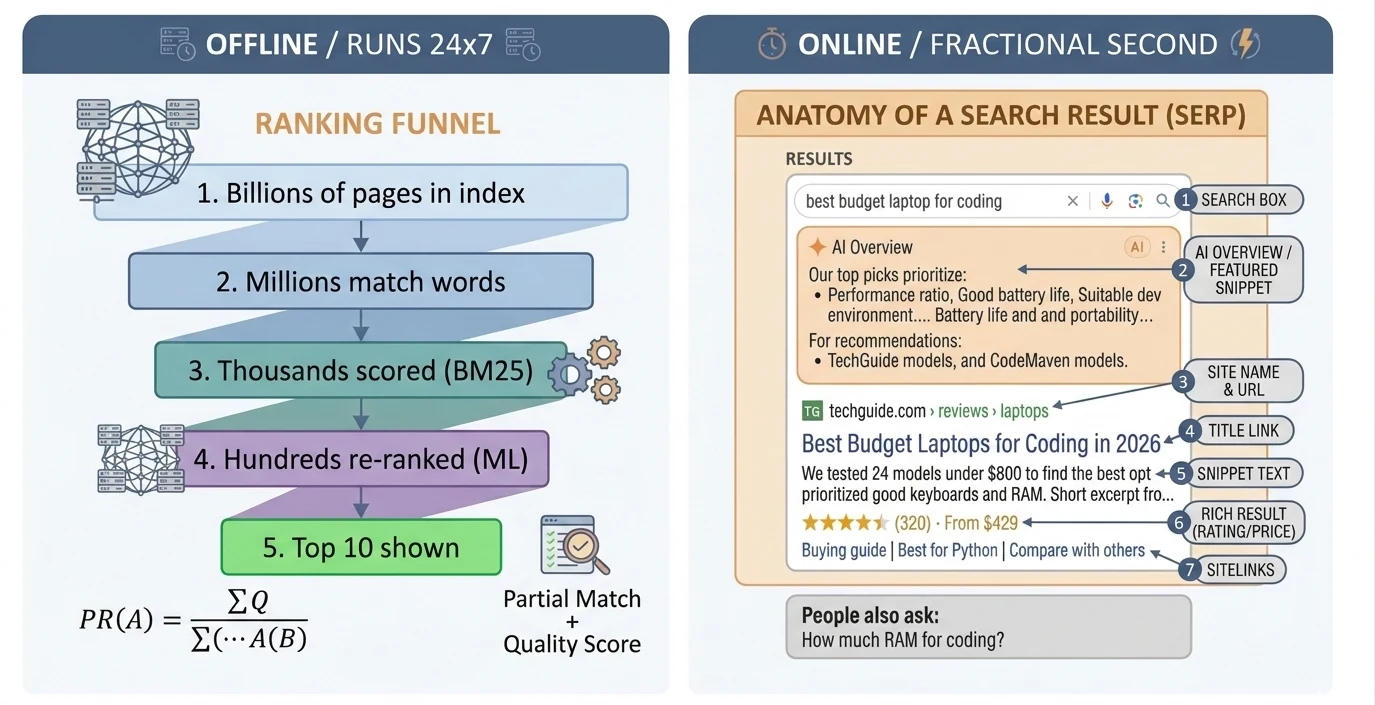
| # | Part of a result | Where it comes from | SEO tip |
|---|---|---|---|
| 1 | Search box | Autocomplete from query logs | Reveals real user phrasing |
| 2 | Featured snippet / AI overview | Extracted or generated from top pages | Clear headings, lists, short answers |
| 3 | Site name and URL | Page URL, breadcrumb and site markup | Clean, descriptive URLs |
| 4 | Title link | The <title> (may be rewritten) | Unique and accurate; keep it concise (roughly 50 to 60 characters) |
| 5 | Snippet | Meta description or best-matching text | Answer the query in your content |
| 6 | Rich result | Structured data (Schema.org JSON-LD) | Add Product, Review or FAQ markup that matches visible content |
| 7 | Sitelinks | Site structure and internal links | Clear navigation hierarchy |
12. Conclusion
Search works as a pipeline: crawl to discover pages, index to organize them, rank to decide the order, and present the result. Crawling comes first because a page that is never fetched cannot be found. For site owners the takeaways are practical:
- Let verified crawlers reach the pages that matter.
- Keep crawlers out of traps such as endless filters, calendars and session URLs.
- Keep important pages close to the homepage.
- Set your AI bot policy by job: training, search or user-triggered.
- Back it with real bot management instead of relying on robots.txt alone.